SATAFIRM S11 – after all, what happened to the SSD?
You turn on your computer and it simply doesn't boot the Operating System.
The message indicates the absence of a boot device, as if the SSD had disappeared. When accessing the BIOS/UEFI to investigate, something strange appears: the SSD is being identified as SATAFIRM S11.
This behavior raises immediate questions: did the SSD burn out? Did you lose the data? Is there a solution?
What does SATAFIRM S11 mean?
When an SSD appears as SATAFIRM S11, this usually indicates a failure in the controller firmware, very common in models with the Phison S11 CP33238B (PS3111) controller, used in various SSDs, especially from Kingston.
In this condition, the SSD is not operating normally. Instead, it enters a safe or emergency mode, where the main firmware was not loaded correctly.
This type of generic identification can also occur in other brands, such as:
- SanDisk - SANDISK Milpitas SSD or SandForce in some older models
- Silicon Motion - SM2246, SM2258XT, SM2259XT, SM2263XT, Silicon Motion NVMe or SMI
- Maxio / Maxiotek - MAP1202, MAS0902, MaxioTech, NVMe or SSD Controller in some models
- Realtek - RTS5735DL, RTS576x appear as Realtek NVME, RTK NVME or even NVMe SSD
- Yeestor - YSTOR, YS9082 or YS9083 YSTOR SATA
- Generic SSD - controller or incomplete device names
These names indicate that the SSD has lost its original identity — a strong sign of firmware corruption.
The role of firmware in an SSD
To understand the problem, it is essential to understand the role of firmware.
Firmware is the internal software of the SSD, responsible for:
- managing data reading and writing
- controlling the use of NAND memories
- executing algorithms such as wear leveling and ECC
- managing the mapping table (FTL – Flash Translation Layer)
- ensuring the overall operation of the device
Without the firmware functioning correctly, the SSD simply cannot operate.
Why does the SATAFIRM S11 error occur?
The main cause is related to the corruption of firmware data, which is also stored in NAND flash memory, in a reserved area, and this data degrades.
Over time, these memories suffer natural wear and tear. This wear and tear can cause the stored bits to change due to the loss of electrical charge retention capacity, leading to the corruption of data critical to the SSD's operation.
When this affects the firmware, the controller may be unable to validate or load the SSD's internal system.
The role of CRC in fault detection
An important part of this process involves CRC (Cyclic Redundancy Check).
CRC is a mechanism used to verify data integrity using a specific algorithm.
Here's how it works:
- A mathematical value (CRC) is calculated based on the firmware data.
- This value is stored along with the data.
- When the SSD initializes, it recalculates the CRC.
- The recalculated value is compared to the original.
- If the values match → healthy firmware.
- If they are different → corrupted firmware.
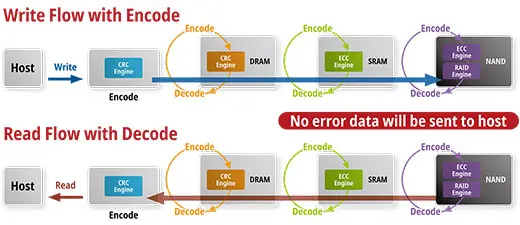
CRC check on the data read and write stream in NAND Flash memory
When a discrepancy occurs, the controller detects the fault and prevents normal SSD initialization, putting the device into an error state — resulting in identification as SATAFIRM S11.
Common symptoms of the SATAFIRM S11 error
In addition to incorrect identification, some typical signs include:
- SSD not correctly recognized in the BIOS.
- System does not start (no boot device).
- SSD capacity not displayed correctly.
- Freezes when trying to access the device.
- Sudden disappearance of the SSD.
This type of failure usually occurs suddenly, without prior warning.
Does SATAFIRM S11 have a solution?
It depends on the objective: to get the SSD working again or to recover the data.
SSD Repair (firmware rewriting)
There are tools that can rewrite the SSD firmware:
- satafirm s11 repair tool
- s11 flasher
- MP Tool (Mass Production Tool)
These tools can rewrite the SSD firmware and restore its functionality.
However, there are two critical points:
1 - This process usually completely erases the data stored on the SSD.
This happens because the internal mapping (FTL) is rebuilt from scratch.
2 – If the SSD has a problem, it means that its NAND Flash memories are already degraded and are no longer reliable!
Data Recovery (professional approach)
If the data is important, the correct path is specialized data recovery.
In the laboratory, techniques such as the following can be used:
- direct access to NAND memories
- reconstruction of the FTL table
- logical reading and reconstruction of data
This process is more complex, but it can recover information even when the SSD is in SATAFIRM S11 state.
For those who want to understand how this type of failure is handled in practice, including reading the NAND memories and reconstructing the data, also see our detailed article on recovering a Kingston SSD with SATAFIRM S11 using professional equipment.
Why not try to fix it yourself?
Many users, when searching for terms like satafirm s11 fix or satafirm s11 repair tool, end up trying to solve the problem with tools available on the internet.
The risk is high.
Rewriting the firmware:
- erases the data and RESETS all the content of the SSD
- alters the internal state of the SSD
- may make subsequent recovery difficult or impossible
If there is any important data, it is best not to perform this type of procedure.
Is the SSD still reliable after this error?
In most cases, no.
If the firmware has been corrupted due to NAND memory degradation, this indicates that:
- the SSD has already suffered significant wear and tear
- other failures may occur
- the reliability of the device is compromised
Even after eventual repair, the SSD should not be considered safe for storing important data.
Conclusion
The Satafirm S11 error is a clear indication of a critical failure in the SSD firmware, usually associated with NAND memory degradation or internal data corruption.
Although tools exist to rewrite the firmware, this process usually results in total data loss.
Therefore, if the SSD presents this problem and there are important files, do not format, do not use repair tools, and do not attempt to reinstall the system.
The best approach is to seek specialized technical analysis for SSD data recovery, significantly increasing the chances of safely recovering the information.
Frequently Asked Questions about SATAFIRM S11
What is SATAFIRM S11?
SATAFIRM S11 is an error state in SSDs with a Phison S11 controller, where the firmware has been corrupted and the device is now generically identified by the system.
Can SATAFIRM S11 be repaired?
Yes, in some cases it is possible to rewrite the firmware using specific tools. However, this process usually erases all data from the SSD.
Is it possible to recover data from an SSD with SATAFIRM S11?
Yes. Even when the SSD is not recognized correctly, the data may still be present in the NAND memories and can be recovered with specialized techniques.
What causes the SATAFIRM S11 error?
The most common causes include firmware corruption, NAND memory failures, power interruptions, and natural wear and tear of the storage cells.
Can I safely use tools like S11 Flasher?
These tools can restore the SSD's functionality, but they usually erase all data. If there are important files, it is not recommended to use them before attempting data recovery.
* updated on 05/14/2026