

Why do SSDs Fail? Understanding the Causes of a Corrupted SSD
SSDs (Solid State Drives) have become the primary storage medium in modern computers thanks to their high speed, low power consumption, and lack of moving parts. Unlike traditional hard disk drives (HDDs), which use magnetic platters and mechanical components, SSDs store data on electronic memory chips.
Despite this advanced technology, SSDs are not immune to failure. Like any electronic device, they can experience defects that lead to loss of data access or even complete device failure.
Why do SSDs fail?
SSDs can fail primarily due to wear and tear on the NAND memory cells, controller failure, firmware errors, power interruptions, or physical damage. Since each memory cell has a limited number of write and erase cycles, continuous use over the years can degrade data retention capacity. Additionally, electronic problems or power outages can corrupt the SSD's mapping table and prevent access to files.
How SSD storage works
To understand why SSDs fail, it's important to understand how they store information.
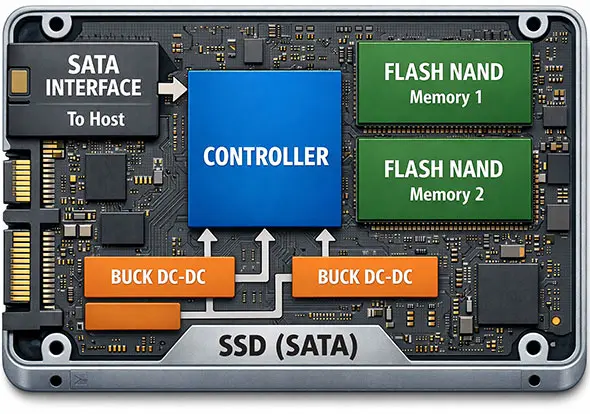
Detailed diagram of a SATA SSD - Image Credit: Press Release
Data is stored in flash NAND memory cell, which are composed of millions (or billions) of electronic cells based on MOSFET transistors. Each cell has a structure called a floating gate, responsible for storing electrons that represent the bits of information.
Data recording occurs when electrons are forced to pass through a thin insulating oxide layer through a phenomenon called quantum tunneling. This process alters the electrical state of the cell, allowing it to represent the stored data.
Although extremely efficient, this mechanism has an important limitation: each memory cell supports only a finite number of write and erase cycles.
Main Causes of SSD Failure
| Cause | Description |
|---|---|
| NAND Memory Wear and Tear | Cells have a limited number of write and erase cycles. |
| Controller Failure | The controller manages data access and can make the SSD inaccessible. |
| Firmware Error | Bugs in the internal software can cause data corruption. |
| Power Failure | Power outages can corrupt the SSD's mapping table. |
| Physical Damage | Impacts or electrical surges can damage the components. |
NAND Flash Memory Wear
NAND cell wear is the main cause of SSD failure.
Each time data is written or erased, a cycle known as the Program/Erase Cycle (P/E cycle) occurs. During this process, electrons repeatedly pass through the oxide layer surrounding the floating gate.
Over time, this insulating layer undergoes microscopic degradation. Small imperfections begin to appear, allowing electrons to escape. This reduces the cell's ability to maintain a stable charge, affecting data retention.
When degradation reaches a certain level, the cell ceases to reliably store data. This can cause:
- read errors
- data corruption
- defective sectors
- permanent loss of information
To reduce this wear, manufacturers implement techniques such as wear leveling, which distributes writes evenly across all memory cells.
SSD Controller Failure
Another critical point in an SSD is the controller, a microprocessor responsible for coordinating virtually all device operations.
Among its functions are:
- NAND memory management
- execution of error correction algorithms (ECC)
- wear leveling control
- management of the logical mapping table (FTL – Flash Translation Layer)
The controller functions as the "brain" of the SSD. When it malfunctions, the device can become completely inaccessible.
In many cases of controller failure, the SSD is no longer recognized by the operating system or appears with incorrect capacity. Even so, the data may still be physically present in the memory chips.
Firmware Problems
Firmware is the internal software that controls the operation of the controller and manages communication between the SSD and the system.
Failure in this firmware can cause several problems, such as:
- SSD freezing
- corruption of the internal mapping table
- loss of access to data
- reduced performance
Some SSD models have already presented firmware failure that caused the device to stop working after a certain number of hours of use.
In these cases, firmware updates provided by the manufacturers can correct the problem — provided the SSD is still accessible.
Power Failure
Power outages or unexpected shutdowns can cause data corruption in SSDs.
During write operations, the SSD performs several tasks simultaneously, such as updating the mapping table, writing data to NAND pages, and reorganizing internal blocks.
If power is interrupted at this time, problems such as:
- Flash Translation Layer (FTL) corruption
- Logical mapping inconsistency
- Cached data loss
- Firmware corruption
Enterprise SSDs usually have power loss protection capacitors, which allow pending operations to be completed. Many home-use SSDs do not have this feature.
Temperature and Environmental Conditions
Temperature also directly influences the lifespan of an SSD.
High temperatures can accelerate the wear of NAND cells and affect the operation of the controller. In poorly ventilated environments or in notebooks subjected to intense loads, the SSD can reach high temperatures.
Among the most common effects are:
- Automatic performance reduction (thermal throttling)
- Increased read errors
- Accelerated memory degradation
Maintaining good system ventilation helps preserve the proper functioning of the device.
Physical damage and electrical problems
Although more resistant than mechanical hard drives, SSDs can still suffer physical or electrical damage.
Possible causes include:
- Drops or impacts
- Exposure to moisture
- Electrical discharges
- Voltage surges
- Power supply defects
These problems can damage components on the electronic board or destroy NAND memory chips.
How to reduce the risk of SSD failure
Although no storage media is completely reliable, some practices help to significantly increase the lifespan of the SSD:
- Maintain regular backups
- Avoid abrupt computer shutdowns
- Use quality power supplies
- Maintain good system ventilation
- Monitor SSD health using SMART
These measures help minimize the risk of data loss.
Corrupted SSD: What to do?
If an SSD malfunctions, becomes corrupted, or stops being recognized by the system, the most important thing is to immediately stop using the device.
Avoid procedures such as:
- formatting the SSD
- reinstalling the operating system
- attempting repair with generic software
These actions can overwrite important information and drastically reduce the chances of data recovery.
In many cases, even when the SSD is not recognized by the computer, the data is still present in the NAND memory chips and can be recovered with specialized SSD data recovery techniques.
Therefore, when identifying signs of failure in an SSD, the best decision is to seek a specialized technical evaluation before any repair attempt.
Technical Analysis of SSD Failures
Problems with corrupted SSDs are relatively common in computers and servers. VEXUS is a company specializing in SSD data recovery, with a technical laboratory operating in Campinas and serving clients throughout Brazil, using advanced equipment and methods to directly access the memory chips and reconstruct the stored information.
When the controller fails or the FTL (Flash Translation Layer) table is corrupted, the data may still remain physically stored in memory. Advanced techniques allow direct access to the NAND chips and reconstruction of the logical data structure, a process known as translation reconstruction or NAND reconstruction.
Frequently Asked Questions about Corrupted SSDs
Can an SSD fail suddenly?
Yes. Unlike traditional hard drives, which often show signs of progressive failure, an SSD can suddenly stop working due to problems with the controller, corrupted firmware, or electrical failures.
Is it possible to recover data from an unrecognized SSD?
In many cases, yes. Even when the SSD is not detected by the computer, the data may remain stored in the NAND memory chips and can be recovered with specialized techniques.
Does formatting a corrupted SSD solve the problem?
No. Do not format the SSD! Formatting can erase important information and reduce the chances of data recovery if there is a physical or logical failure in the device.
* updated on 12/03/2026


